For makers · Digital download
Crochet & Knitting Pricing Calculator
Yarn cost per gram, ounce, meter or yard, stuffing, eyes and your hours. Fair prices, fees, profit and your real hourly rate per project.
$12
Prices in USD. Sales tax / GST/HST calculated at checkout.
Canadian buyers: you pay in USD and your card converts to CAD automatically.
- 1 × .xlsx file, instant download
- Works in Excel, Google Sheets, Numbers, LibreOffice
- No macros, no subscription
- Sample data included
Look inside the spreadsheet
Real screenshots of the file with its sample data. Click any image to zoom.
What's inside
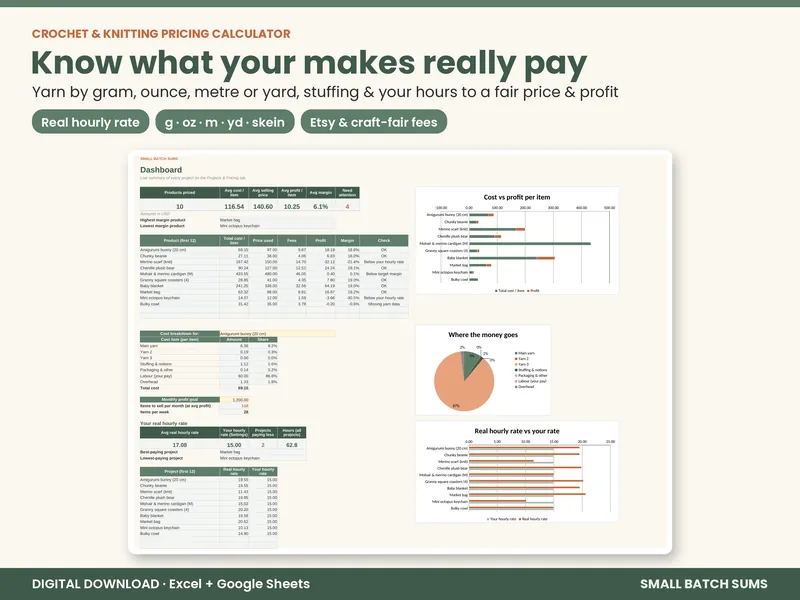
How much should you charge for that amigurumi, beanie or blanket? This Crochet & Knitting Pricing Calculator turns what you paid for yarn into an exact cost per gram, ounce, meter, yard or skein. It adds stuffing, safety eyes, notions, packaging, your hours and overhead, then shows a fair price, the real profit after fees and what each project actually pays you per hour.
What it does
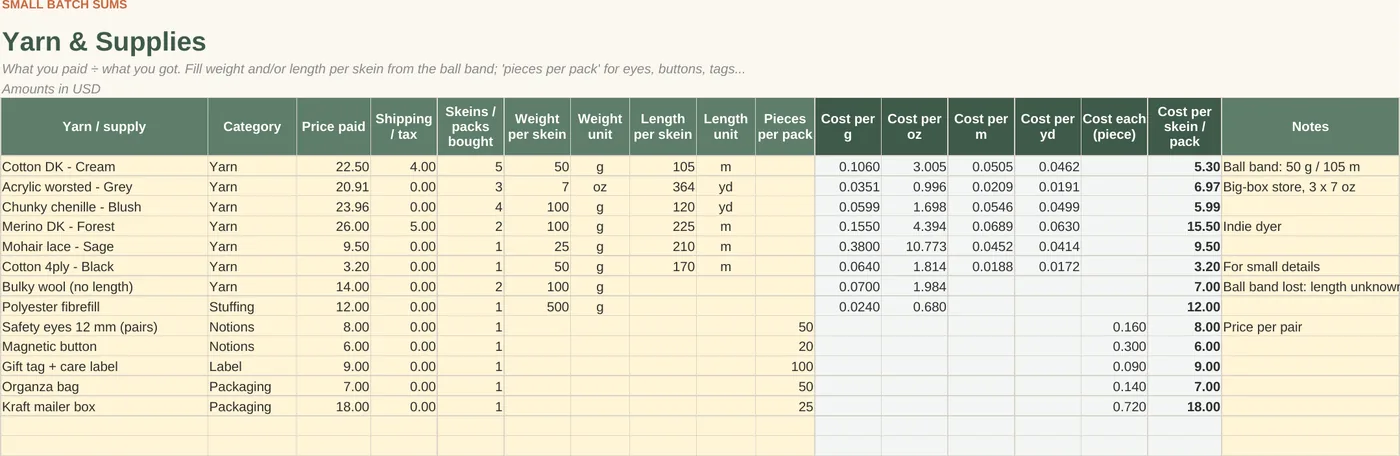
- Yarn & Supplies tab: enter the price you paid (plus shipping), how many skeins, and the weight and/or length from the ball band. You get the cost per g, oz, m, yd and skein, and the cost per piece for eyes, buttons, tags and bags
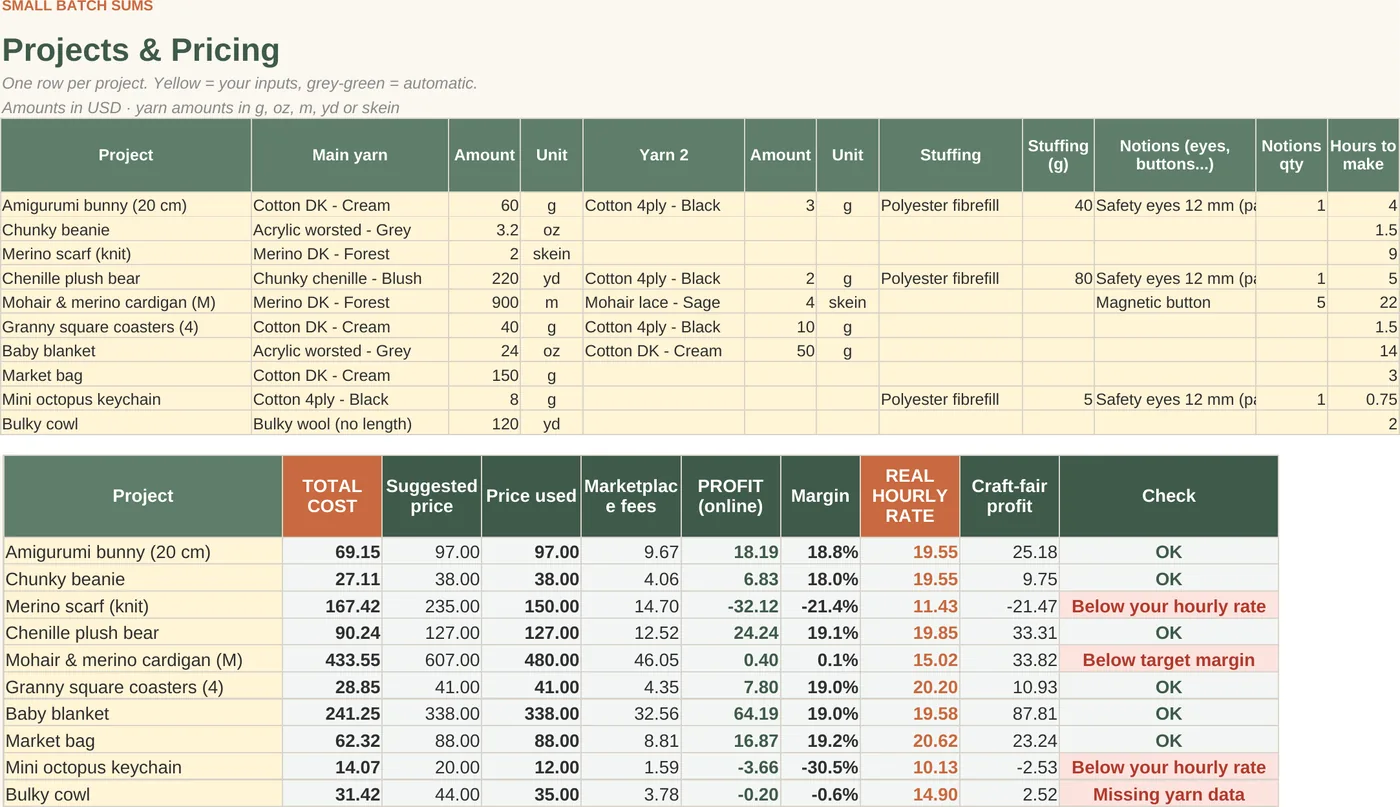
- Projects & Pricing tab: up to 3 yarns per project, each in g, oz, m, yd or skeins, plus stuffing (g), notions, packaging, other costs and hours to make
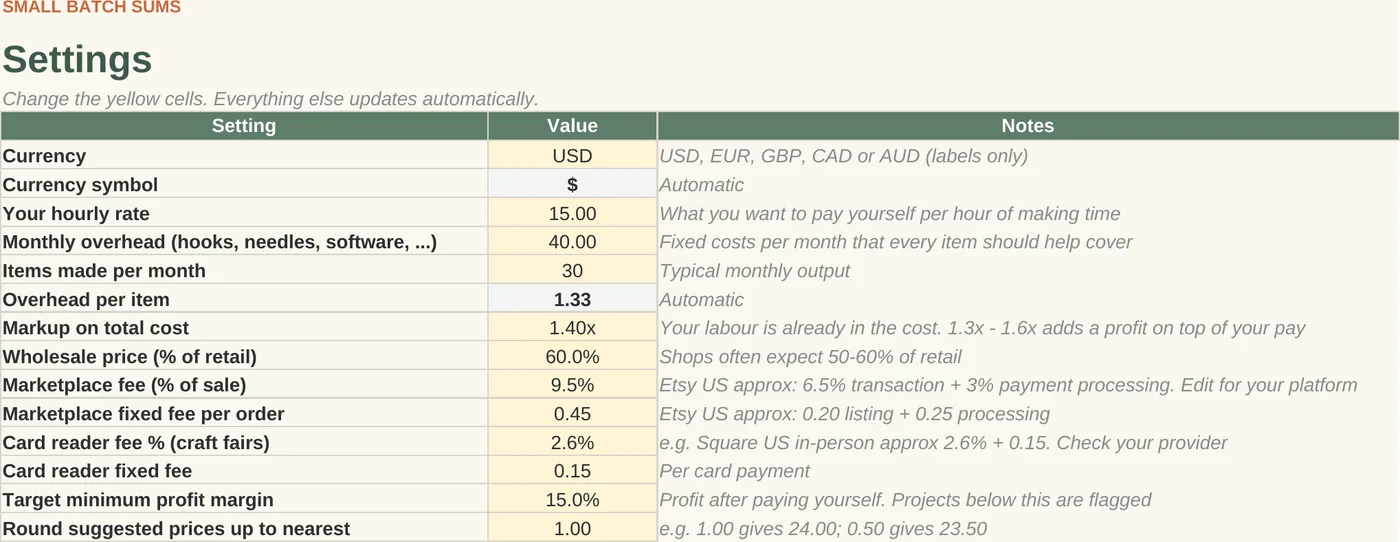
- Total cost includes your labor (your hourly rate × hours) and a share of monthly overhead
- Suggested price (your markup), marketplace fees (Etsy-style % + fixed fee, editable), profit and margin
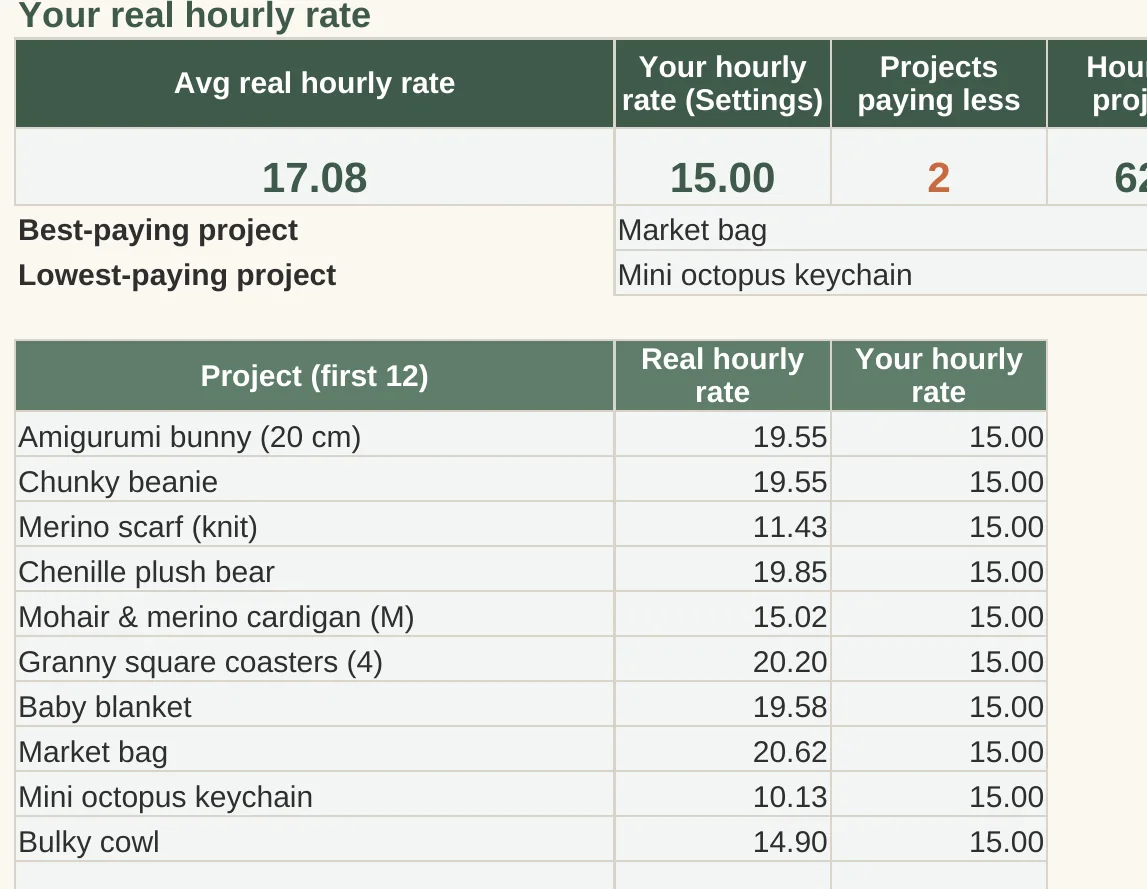
- REAL HOURLY RATE for every project: (price − fees − materials − overhead) ÷ hours, so you can see which makes are worth your time
- Craft-fair profit using your card-reader fee, plus a wholesale price for reference
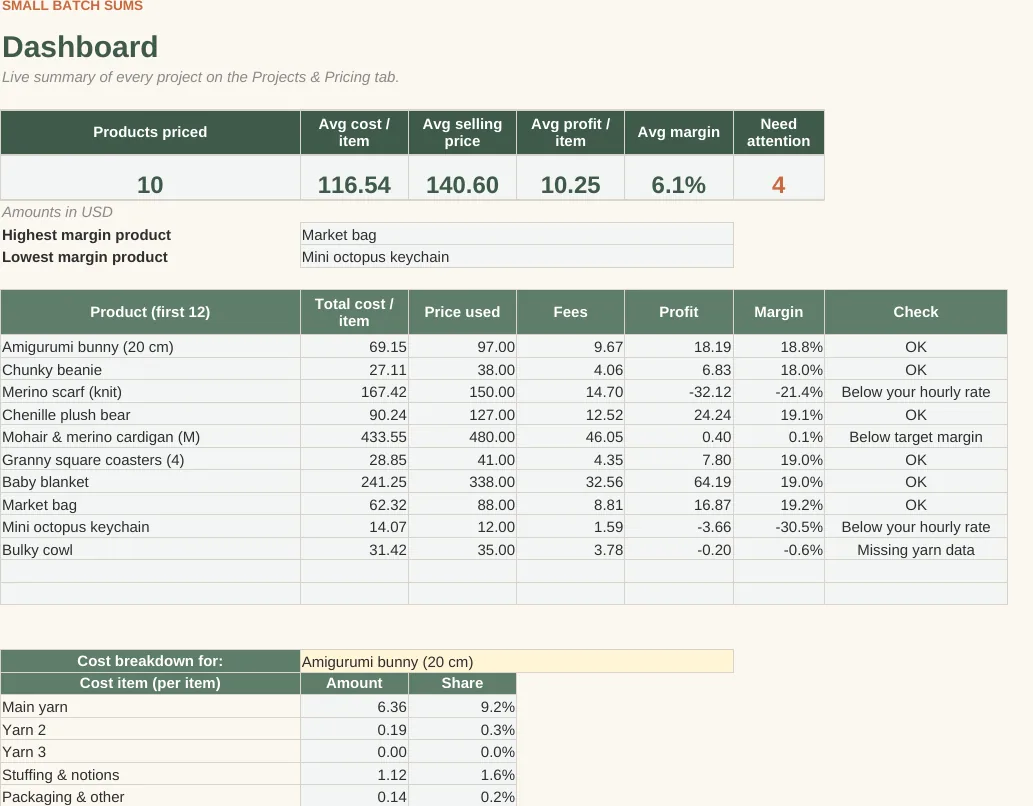
- Check column flags missing yarn data (e.g. yards entered for a yarn with no length), projects that don't cover materials, pay less than your hourly rate, or fall below your target margin
- Optional "Your price" column: see the real profit at the price you charge today
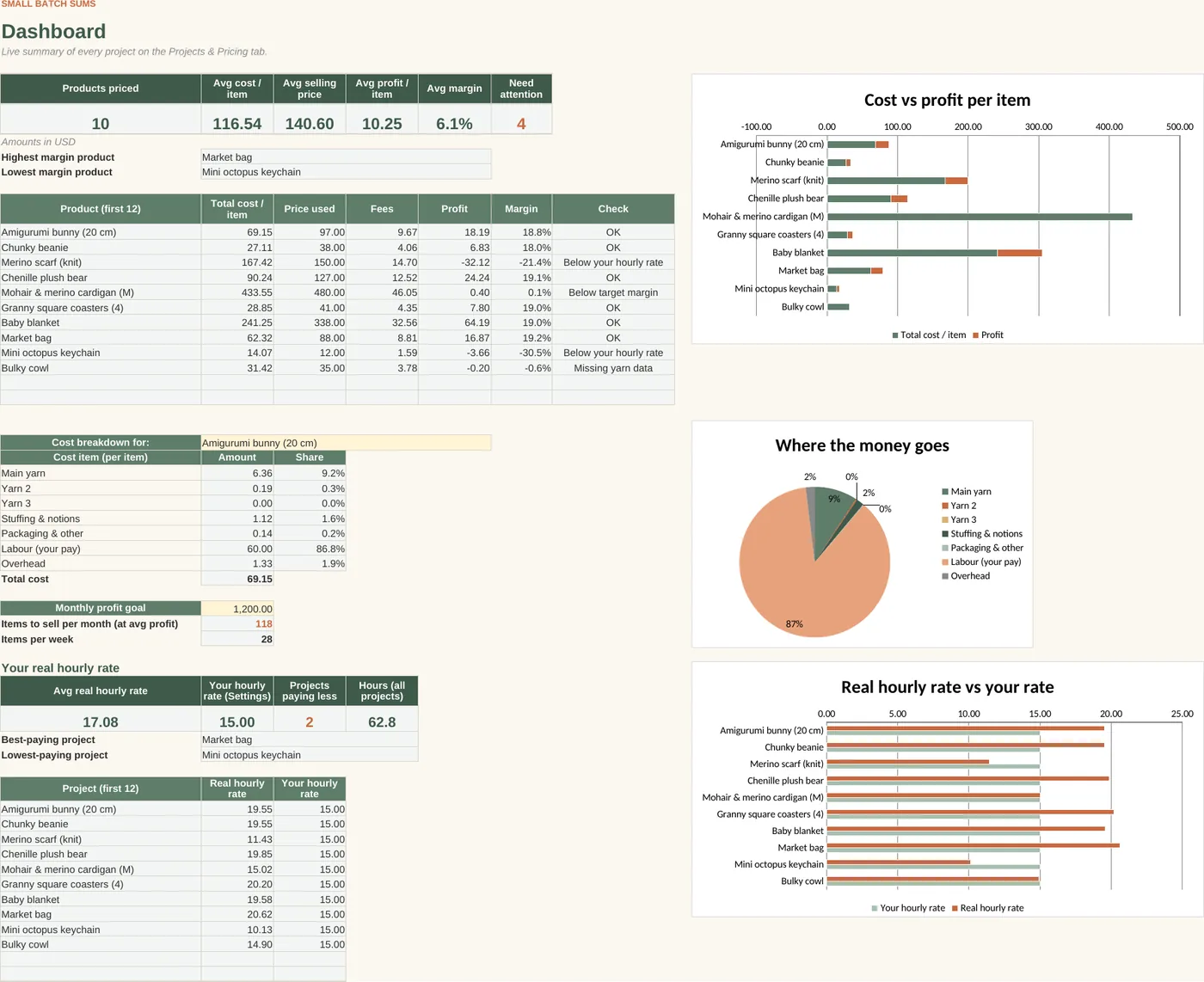
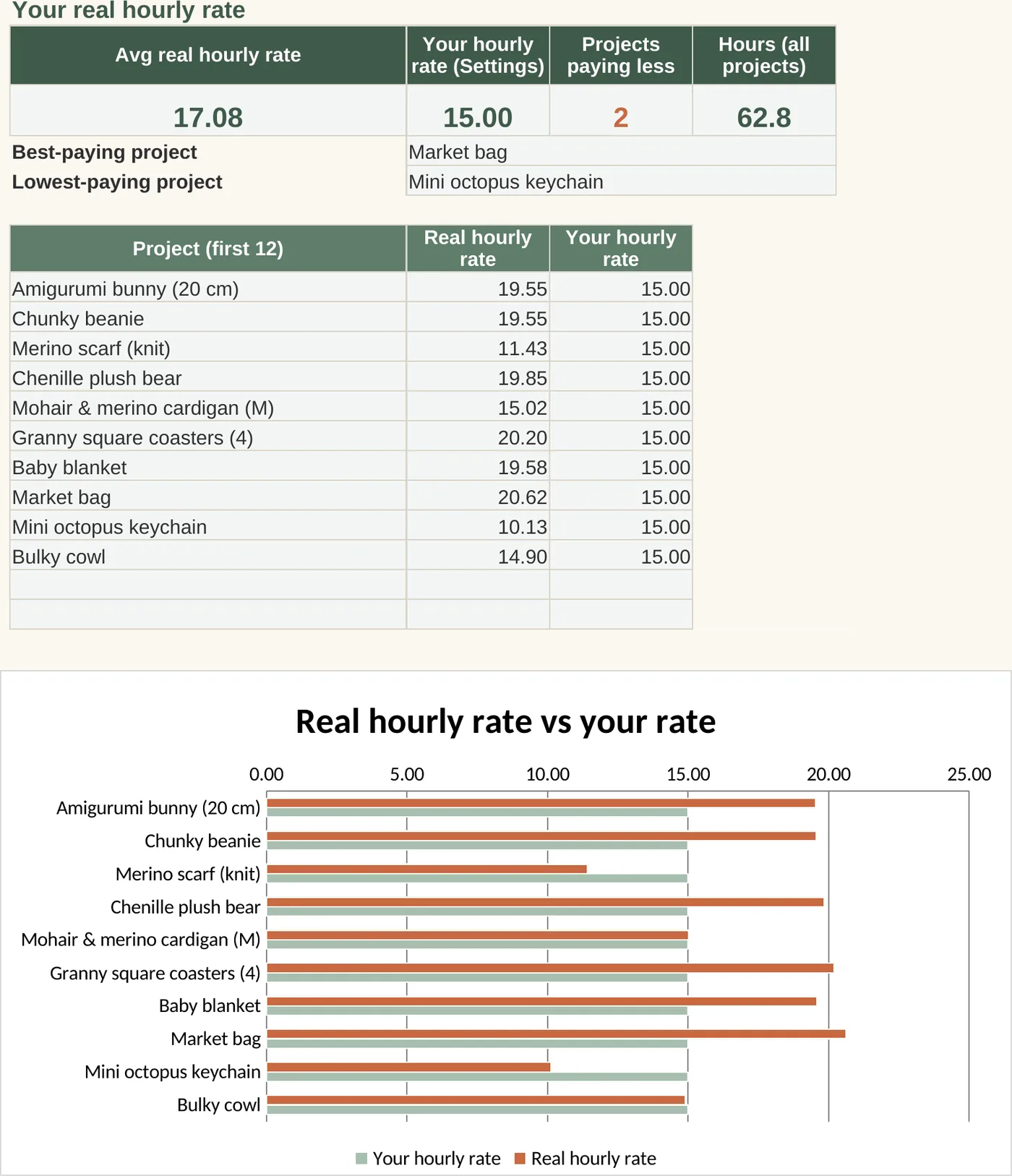
- Dashboard: averages, cost-vs-profit chart, cost breakdown pie for any project, real hourly rate vs your rate chart, best- and worst-paying projects, and how many items you need to sell for your monthly profit goal
- Room for 100 yarns/supplies and 50 projects. Currency label USD / EUR / GBP / CAD / AUD
Easy to use
- Yellow cells are inputs and grey-green cells calculate for you. Formula cells are protected so you can't break them by accident (no password; unlock any time)
- Sample data included, so you can see how it works in seconds
- Start Here tab with step-by-step instructions
Works with
Microsoft Excel (2010 or newer, Windows & Mac), Google Sheets (free; upload and open), LibreOffice and Apple Numbers. No macros and no add-ons.
What you get
1 × .xlsx spreadsheet (5 tabs: Start Here, Dashboard, Settings, Yarn & Supplies, Projects & Pricing)
Please note
- This is a DIGITAL product. Nothing will be shipped.
- Default marketplace and card-reader fees are approximations (Etsy US, Square US in-person). Fees vary by country and change over time, so please enter your own.
- This is a planning tool, not financial or tax advice.
- For personal or single-business use. Please don't resell or share the file.
FAQ
Can I enter yarn in grams or yards?
Both. Enter the weight and/or length from the ball band once, then use grams, ounces, meters, yards or whole skeins in each project. If a project uses a unit the yarn row can't convert, the Check column tells you.
What is the real hourly rate?
It is what a project actually pays you per hour: price minus fees, materials and overhead, divided by the hours it took. The Dashboard compares it with the hourly rate you want to earn.
What exactly do I get?
One .xlsx spreadsheet file, delivered as an instant download link after payment. Nothing is shipped.
Does it work on a Mac or iPad?
Yes. Open it in Excel for Mac, Apple Numbers, or Google Sheets in your browser or the Google Sheets app on iPad. No macros, so nothing is blocked.
Can I use it in Google Sheets for free? Do I need Excel?
You don't need Excel. Upload the file to Google Drive and open it with Google Sheets, which is free with a Google account. It also works in Excel 2010 or newer, LibreOffice and Numbers.
Is it a one-time payment?
Yes. You pay once. No subscription, no recurring charges.
Do I get lifetime access and free updates?
Yes. The file is yours to keep and use for your own business for as long as you like, and future fixes and updates to the same product are free.
What if I get stuck?
Every file has a Start Here tab and sample data. If you're still stuck, email us and we'll help, usually within 2 business days.
Can I get a refund?
If a formula doesn't work, we'll fix it or refund you. See the refund policy for details.
Does it work for Canada (CAD and metric units)?
Yes. The currency symbol is editable, and you can use metric units (grams, kilograms, centimeters, kilometers) where the sheet asks for units. Prices on this site are in USD; your card converts automatically.
Can I share or resell the file?
The license is for one person or one business. Please don't share, resell or redistribute the file.
Coming soon
AI-assisted, every formula checked by hand. How we build our spreadsheets